Understanding and Managing ACH Authorizations
Last updated: April 10, 2026
Meow Technologies is a financial technology company, not a bank or FDIC-insured depository institution. Banking services are provided by Grasshopper Bank, N.A.
What are ACH Authorizations?
ACH Authorizations allow you to pre-approve specific vendors or payment processors to pull funds via ACH from your account. This feature helps prevent unauthorized transactions and reduces the risk of fraud.
Enabling ACH Authorizations
To enable ACH Authorizations for your account:
When ACH Authorizations are not enabled, all ACH transactions from vendors are automatically approved without requiring pre‑authorization, so they process immediately.
Toggle the feature on
Adding Authorized Contacts
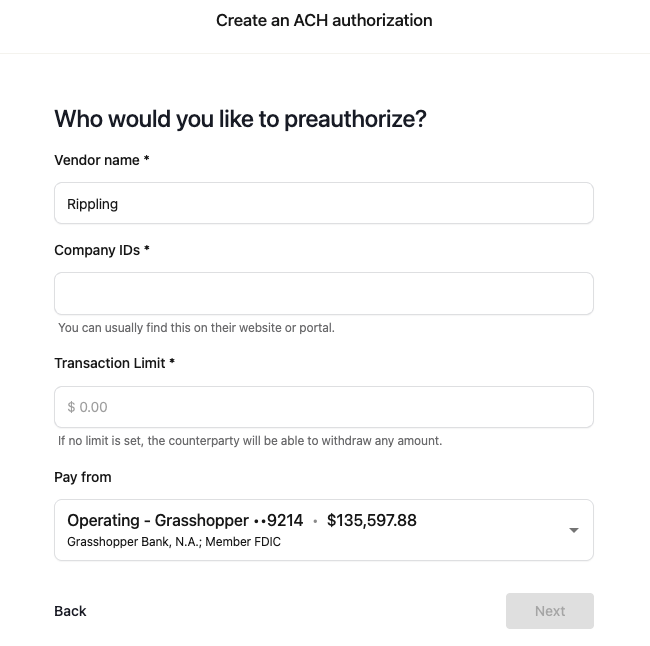
To add a new authorized contact:
Click "Add Authorized Contact"
If you don't have contact details, you can skip the first step.
In the second step:
Search for an existing vendor or create a new one
Enter the Company ID(s) provided by the vendor
Set a transaction limit if desired
The “Company ID” field refers to the ACH code or number that your vendor provides, which may also be called an “Originator ID” or “ACH Company ID”.
Contact your vendor’s billing or payments department and ask for their “ACH Company ID” or “Originator ID”.
Check any payment‑setup documentation, invoices, or online portal where the vendor lists ACH details.
The ID is typically a 10‑digit number that identifies the company in the ACH network.
Removing Authorized Contacts
Locate the vendor you wish to remove from the authorization list
Select the option to delete or revoke their authorization
Managing Unauthorized Transactions
Transactions from vendors not on your ACH authorization list will be flagged and held in the "approvals section". You have until 3pm ET on the same day to approve these transactions. If you do not approve a transaction by the 3pm ET deadline, it will be returned/rejected. You will receive an email notification when an incoming debit is attempted.
Note: Even if you've authorized a vendor, transactions may still be flagged if that vendor uses a different Company ID than the one you authorized. Check the Company ID on the rejected transaction and compare it to your authorized contacts to identify if you need to add an additional Company ID for that vendor.
Important Considerations
Company IDs are unique identifiers, but they may sometimes be shared by multiple vendors if they use the same payment processor.
Each Company ID can only be assigned to one vendor entry in your system.
The names you assign vendors on your ACH allowlist are for your own reference. They don't affect the authorization process.
Some vendors may have multiple Company IDs for different transaction types or purposes (e.g., one for general expenses, another for specific services). If a transaction from an authorized vendor is still rejected, check if it's using a different Company ID than the one you authorized. You'll need to create a separate authorized contact entry for each Company ID, or manually approve transactions using the new ID.
Troubleshooting
If you encounter issues while adding Company IDs:
Refresh the page to see if the changes have been applied.
If an ID is flagged as already assigned, check your existing authorizations for potential duplicates.
For persistent issues, contact support for assistance.
Advanced ACH Authorization Scenarios and Best Practices
Handling Complex Vendor Relationships
Multi-processor vendors: Some large vendors (like Amazon, Shopify, or major SaaS providers) may use different payment processors for different services or regions. Contact your vendor to get a complete list of all Company IDs they might use to avoid unexpected rejections.
Seasonal or temporary processors: During high-volume periods (Black Friday, tax season), some vendors switch to backup payment processors with different Company IDs. Ask vendors about their contingency payment processing arrangements.
Proactive Authorization Management
Audit your authorizations quarterly: Review your authorization list every 3 months to remove vendors you no longer use and add new ones before they attempt their first transaction.
Monitor flagged transactions regularly: Check the flagged transactions tab every few days and watch for email notifications to avoid missing approval deadlines that could result in returned payments.
Test new vendor setups: When onboarding a new vendor, ask them to process a small test transaction first to verify your authorization is working correctly before any large payments are due.
Document vendor communication: Keep records of Company IDs provided by vendors, including the date received and contact person, as vendors sometimes provide incorrect or outdated IDs initially.
Emergency Procedures
Same-day approval workflow: If you miss the 3pm ET deadline for approving unauthorized transactions, contact your vendor immediately to arrange alternative payment methods or request they resubmit the ACH request the next business day.
Backup payment methods: Maintain alternative payment methods (wire transfer, check, or credit card) for critical vendors in case ACH authorization issues arise during important payment deadlines.
Remember: ACH Authorizations primarily work based on Company IDs, not vendor names. The same ID might be used by multiple vendors if they share a payment processor.