How do I set up approval workflows for transfers and payments?
Last updated: April 10, 2026
Context
You want to set up approval workflows so that certain users can initiate transfers or payments, but require approval from administrators before the transactions are processed. This is useful when you have bookkeepers, controllers, or other team members who need to create payments but shouldn't be able to send money without oversight.
Answer
You can set up approval workflows using Spend Controls in your account settings. Here's how to configure them:
Setting Up Spend Controls
Navigate to Settings > Security Policies
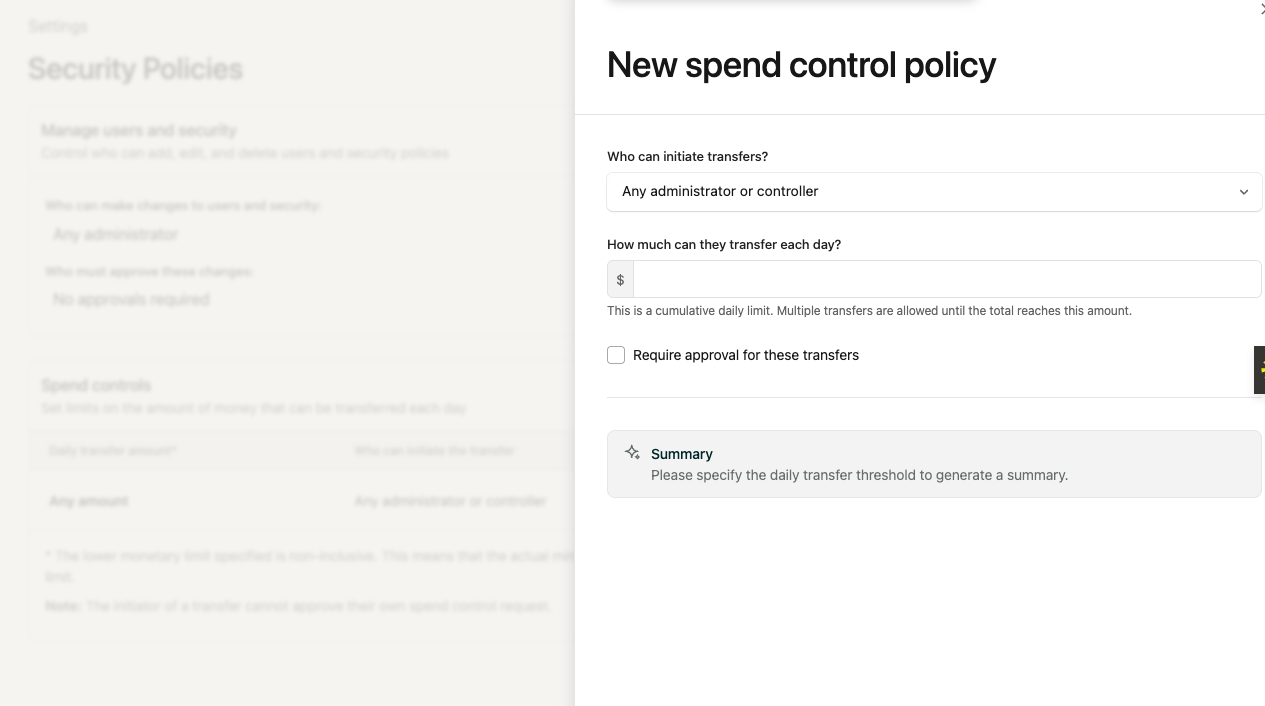
Click "New Policy" to create a spend control policy
Configure the following settings:
Who can initiate transfers: Select the users who can create payment requests (e.g., controllers, bookkeepers)
Transfer limit: Set the daily transfer limit or amount threshold
Require approvals: Check this box to enable the approval workflow (required for spend control policies to function)
Who can approve: Select which administrators can approve the requests (at least one approver must be selected)
Click "Update Policy" to save your settings
Important Notes
Initiators cannot approve their own requests: The person who creates a payment request cannot also approve it, even if they have approval permissions
User roles matter: Only Controllers and Admins can initiate transfers. Bookkeepers cannot move money unless they're specifically added to a spend control policy. You can also invite users as Controllers and then use spend controls to restrict them to approval-only permissions, allowing them to view accounts and approve transfers without being able to initiate them.
Admin exemptions: You can add admins to an exemption list by clicking "Edit user exemptions" on the Security Policies page, allowing them to make transfers without secondary approval
Bill Pay approval settings: Bill Pay approval workflows are configured separately from general transfer approvals. To set up bill approvals, navigate to the Bill Pay tab and click "Settings" in the top right corner, then configure approval requirements in the "Approval settings" section.
Common Use Cases
Bookkeeper setup: Assign the Controller role to your bookkeeper, then create a spend control policy where they can initiate transfers but require admin approval for all amounts
Threshold-based approvals: Set up policies where transfers under a certain amount don't require approval, but larger amounts do
Multiple approval levels: Create different spend bands with different approval requirements based on transfer amounts
If you need assistance setting up your specific approval workflow, you can reach out to support for guidance on configuring the policies that best fit your business needs.