How to Rename Accounts
Last updated: May 22, 2025
Meow Technologies is a financial technology company, not a bank or FDIC-insured depository institution. Banking services are provided by Grasshopper Bank, N.A.
Our system allows you to customize the names of your bank accounts for easier identification and management. This article will guide you through the process of renaming your accounts.
Steps to Rename a Bank Account
Log in to your account dashboard.
Navigate to the "Banking" or "Accounts" section.
Locate the account you wish to rename.
Look for an "Manage account" and "Edit account name" option next to the account name.
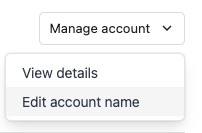
Click on this option to open the editing field.
Enter the new name for your account.
Save your changes.
Best Practices for Account Naming
Use clear, descriptive names that indicate the purpose of the account.
Include relevant information such as "Payroll" or "Taxes" if applicable.
Example Account Names
Here are some examples of clear, descriptive account names:
Insurance Commission Account
Income Account
Profit Account
Owner's Compensation Account
Tax Account
Operating Expenses Account
By renaming your accounts with clear, descriptive names, you can easily distinguish between different accounts and their purposes, making your financial management more efficient.
Note: The ability to rename accounts may vary depending on your account type and permissions. If you're unable to rename an account, please contact our support team for assistance.